---
title: AMIMOTO Database Credentials for Single AMI, RDS, and Amazon Aurora
description: AMIMOTO Database Credentials for Single AMI, RDS, and Amazon Aurora How to check and modify user name, password, host name, database and table prefix on your instances. Tomohyco Tsunoda We have three
---
[Skip to content](https://knowledge.amimoto-ami.com/en/knowledge/amimoto-database-credentials-for-single-ami-rds-and-amazon-aurora#main-content)
English
Show submenu for translations
![Amimoto-dark-ogp.png\]](https://knowledge.amimoto-ami.com/hs-fs/hubfs/Amimoto-dark-ogp.png?height=40&name=Amimoto-dark-ogp.png)
- ホーム
- 製品
- 価格
- ブログ
- 会社
Open main navigation
Close main navigation
- ホーム
- 製品
- 価格
- ブログ
- 会社
- English
Show submenu for translations
- [https://amimoto-ami.com/](https://amimoto-ami.com/)
[https://amimoto-ami.com/](https://amimoto-ami.com/)
Hello. How can we help you?
- There are no suggestions because the search field is empty.
1. [Amimoto Help Center](https://knowledge.amimoto-ami.com/en/knowledge?hsLang=en)
2. [Amimoto AMI](https://knowledge.amimoto-ami.com/en/knowledge/amimoto-ami?hsLang=en)
3. [Tips](https://knowledge.amimoto-ami.com/en/knowledge/amimoto-ami?hsLang=en#tips)
# AMIMOTO Database Credentials for Single AMI, RDS, and Amazon Aurora
AMIMOTO Database Credentials for Single AMI, RDS, and Amazon Aurora How to check and modify user name, password, host name, database and table prefix on your instances. Tomohyco Tsunoda
We have three types of database on our products
- **MySQL (Percona Server)**
- **Amazon RDS**
- **Amazon Aurora**
#### MySQL (Percona Server)
This database type runs on Single AMIs and it's local to the WordPress installation.
For example; a few products using this database type is WordPress powered by AMIMOTO or WooCommerce Powered by AMIMOTO (Apache)
#### Amazon RDS on CloudFormation JIN-KEI
This database type is created when launching an AMIMOTO CloudFormation Product such as [*WordPress powered by JIN-KEI (Simple Stack HVM)*](https://aws.amazon.com/marketplace/pp/B00LWHVJH8) or [*WordPress powered by JIN-KEI (Auto-Scaling)*](https://aws.amazon.com/marketplace/pp/B01MCTURJT)
#### Amazon Aurora on Aurora-ready instances
Amazon Aurora is the most powerful database option for AMIMOTO, it's available on product such as [*WordPress by JINKEI (Simple Stack HVM Aurora)*](https://aws.amazon.com/marketplace/pp/B00LWHVJH8) or [*WordPress by JINKEI (SimpleStack MOD\_PHP Aurora)*](https://aws.amazon.com/marketplace/pp/B01B3ZE1NC)*.*
### Managing for MySQL (Percona Server)
If you're using **Single AMI**, you can find database's credentials in /var/www/vhosts/example.com/local-config.php
You need to SSH or SFTP access to the server to check it.
```
$ ssh -i ~/.ssh/example_com.pem ec2-usr@example.com$ cat /var/www/vhosts/example.com/local-config.php 'YOUR-DATABASE', 'username' => 'YOUR-DATABSE-USERNAME', 'password' => 'YOUR-DATABASE-PASSWROD', 'host' => 'localhost', );}
```
### Managing for RDS and Amazon Aurora
If you're running **CloudFormation**, **JIN-KEI** or **Simple Stack** user, you can find database's credentials (database name, username, password, endpoint and port number) in /opt/aws/cloud\_formation.json.
You have already set MySQLPassword as Aurora or RDS' password while you were setting up the stack.
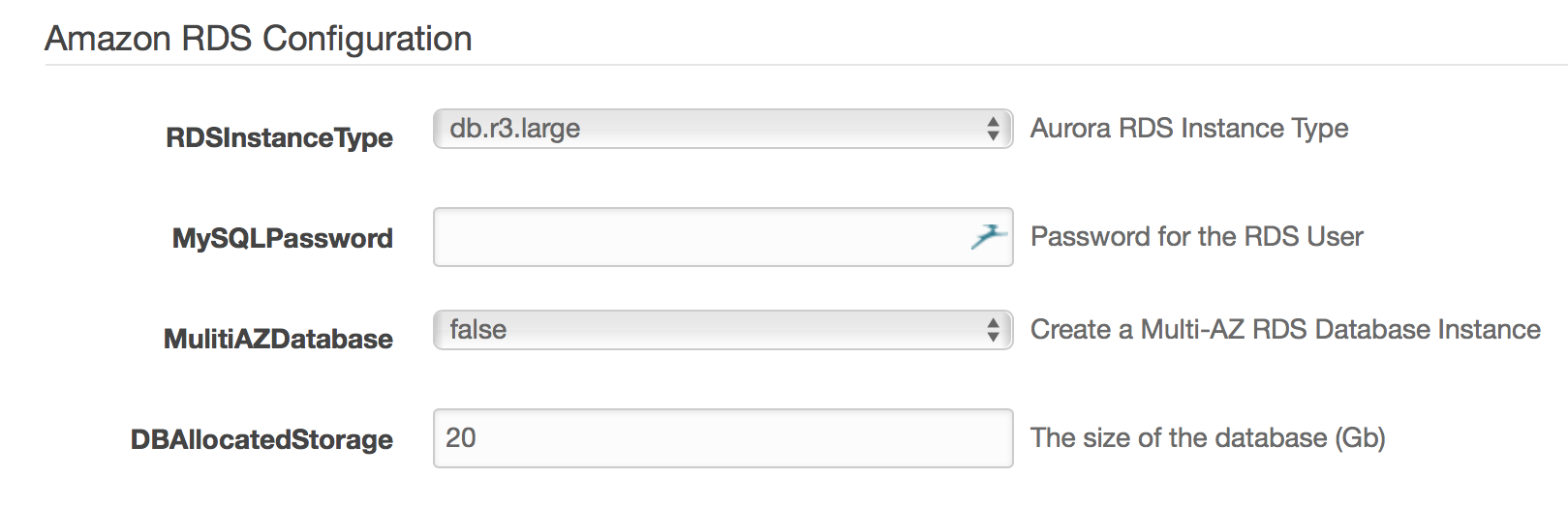
You can also check it on the server through SSH or SFTP access.
```
$ ssh -i ~/.ssh/example_com.pem ec2-user@YOUR-INSTANCE-IP-ADDRESS$ cat /opt/aws/cloud_formation.json{ "rds" : { "database" : "YOUR-RDS-DATABASE", "username" : "YOUR-USERNAME", "password" : "YOUR-RDS-PASSWORD", "endpoint" : "your-rds-endpoint-rdscluster-4fndeaauf9dg.cluster-c8jcval3u4pp.us-east-1.rds.amazonaws.com", "port" : 3306 } }
```
When launching an AMIMOTO CloudFormation or Simple Stack product the database information is generated automatically with the password you've selected during launch and stored in the following JSON file.
[https://github.com/amimoto-ami/jin-kei/blob/master/include/ec2/metadata-for-rds.rb#L1-L38](https://github.com/amimoto-ami/jin-kei/blob/master/include/ec2/metadata-for-rds.rb#L1-L38)
- [Amimoto Managed Hosting](https://knowledge.amimoto-ami.com/en/knowledge/amimoto-managed-hosting?hsLang=en#main-content)
- [Basics](https://knowledge.amimoto-ami.com/en/knowledge/amimoto-managed-hosting?hsLang=en#basics)
- [Amimoto Essential Training](https://knowledge.amimoto-ami.com/en/knowledge/amimoto-managed-hosting?hsLang=en#amimoto-essential-training)
- [Migration tips for AMIMOTO Managed Hosting](https://knowledge.amimoto-ami.com/en/knowledge/amimoto-managed-hosting?hsLang=en#migration-tips-for-amimoto-managed-hosting)
- [Amimoto Dashboard Tips](https://knowledge.amimoto-ami.com/en/knowledge/amimoto-managed-hosting?hsLang=en#amimoto-dashboard-tips)
- [Connecting to the Server](https://knowledge.amimoto-ami.com/en/knowledge/amimoto-managed-hosting?hsLang=en#connecting-to-the-server)
- [Account and Billing](https://knowledge.amimoto-ami.com/en/knowledge/amimoto-managed-hosting?hsLang=en#account-and-billing)
- [Trouble shooting](https://knowledge.amimoto-ami.com/en/knowledge/amimoto-managed-hosting?hsLang=en#trouble-shooting)
- [WordPress Plugins](https://knowledge.amimoto-ami.com/en/knowledge/amimoto-managed-hosting?hsLang=en#wordpress-plugins)
- [Tips for DNS Vendors](https://knowledge.amimoto-ami.com/en/knowledge/amimoto-managed-hosting?hsLang=en#tips-for-dns-vendors)
- [Email](https://knowledge.amimoto-ami.com/en/knowledge/amimoto-managed-hosting?hsLang=en#email)
- [CDN and Cache control](https://knowledge.amimoto-ami.com/en/knowledge/amimoto-managed-hosting?hsLang=en#cdn-and-cache-control)
- [Server & AWS Management](https://knowledge.amimoto-ami.com/en/knowledge/amimoto-managed-hosting?hsLang=en#server-aws-management)
- [Integration](https://knowledge.amimoto-ami.com/en/knowledge/amimoto-managed-hosting?hsLang=en#integration)
- [Development](https://knowledge.amimoto-ami.com/en/knowledge/amimoto-managed-hosting?hsLang=en#development)
- [Amimoto AMI](https://knowledge.amimoto-ami.com/en/knowledge/amimoto-ami?hsLang=en#main-content)
- [Getting Started with Amimoto-AMI](https://knowledge.amimoto-ami.com/en/knowledge/amimoto-ami?hsLang=en#getting-started-with-amimoto-ami)
- [Basics](https://knowledge.amimoto-ami.com/en/knowledge/amimoto-ami?hsLang=en#basics)
- [Connection to Amimoto AMI](https://knowledge.amimoto-ami.com/en/knowledge/amimoto-ami?hsLang=en#connection-to-amimoto-ami)
- [Tips](https://knowledge.amimoto-ami.com/en/knowledge/amimoto-ami?hsLang=en#tips)
- [FAQs](https://knowledge.amimoto-ami.com/en/knowledge/amimoto-ami?hsLang=en#faqs)
- [Trouble shooting](https://knowledge.amimoto-ami.com/en/knowledge/amimoto-ami?hsLang=en#trouble-shooting)
- [Getting Started with Amimoto JIN-KEI](https://knowledge.amimoto-ami.com/en/knowledge/amimoto-ami?hsLang=en#getting-started-with-amimoto-jin-kei)
- [Tips for JINKEI](https://knowledge.amimoto-ami.com/en/knowledge/amimoto-ami?hsLang=en#tips-for-jinkei)
- [Support](https://knowledge.amimoto-ami.com/en/knowledge/amimoto-ami?hsLang=en#support)
- [\[EN\] Amimoto Managed Hosting](https://knowledge.amimoto-ami.com/en/knowledge/en-amimoto-managed-hosting?hsLang=en#main-content)
- [Company and Guidelines](https://knowledge.amimoto-ami.com/en/knowledge/en-amimoto-managed-hosting?hsLang=en#company-and-guidelines)
- ホーム
- 製品
- 価格
- ブログ
- 会社
[](https://ja.amimoto-ami.com/)
Amimoto Help Center
Copyright © 2026, 株式会社デジタルキューブ