---
title: Migrating to AMIMOTO with the All-in-One WP Migration and Backup WordPress Plugin
description: This plugin is freely available in the WordPress Plugins directory. Install directly through your WordPress site or download and upload it through your WordPress Dashboard. Create a complete backup
---
[コンテンツまでスキップ](https://knowledge.amimoto-ami.com/knowledge/migrating-to-amimoto-with-the-all-in-one-wp-migration-wordpress-plugin#main-content)
日本語
翻訳のサブメニューを表示
![Amimoto-dark-ogp.png\]](https://knowledge.amimoto-ami.com/hs-fs/hubfs/Amimoto-dark-ogp.png?height=40&name=Amimoto-dark-ogp.png)
- ホーム
- 製品
- 価格
- ブログ
- 会社
メインナビゲーションを開く
メインナビゲーションを閉じる
- ホーム
- 製品
- 価格
- ブログ
- 会社
- 日本語
翻訳のサブメニューを表示
- [公式サイトへ移動](https://ja.amimoto-ami.com/)
[公式サイトへ移動](https://ja.amimoto-ami.com/)
ヘルプセンター
- 検索フィールドが空なので、候補はありません。
1. [サポートドキュメント](https://knowledge.amimoto-ami.com/knowledge?hsLang=ja)
2. [\[EN\] Amimoto Managed Hosting](https://knowledge.amimoto-ami.com/knowledge/en-amimoto-managed-hosting?hsLang=ja)
3. [Migration tips for AMIMOTO Managed Hosting](https://knowledge.amimoto-ami.com/knowledge/en-amimoto-managed-hosting?hsLang=ja#migration-tips-for-amimoto-managed-hosting)
# Migrating to AMIMOTO with the All-in-One WP Migration and Backup WordPress Plugin
### On existing (running) WordPress
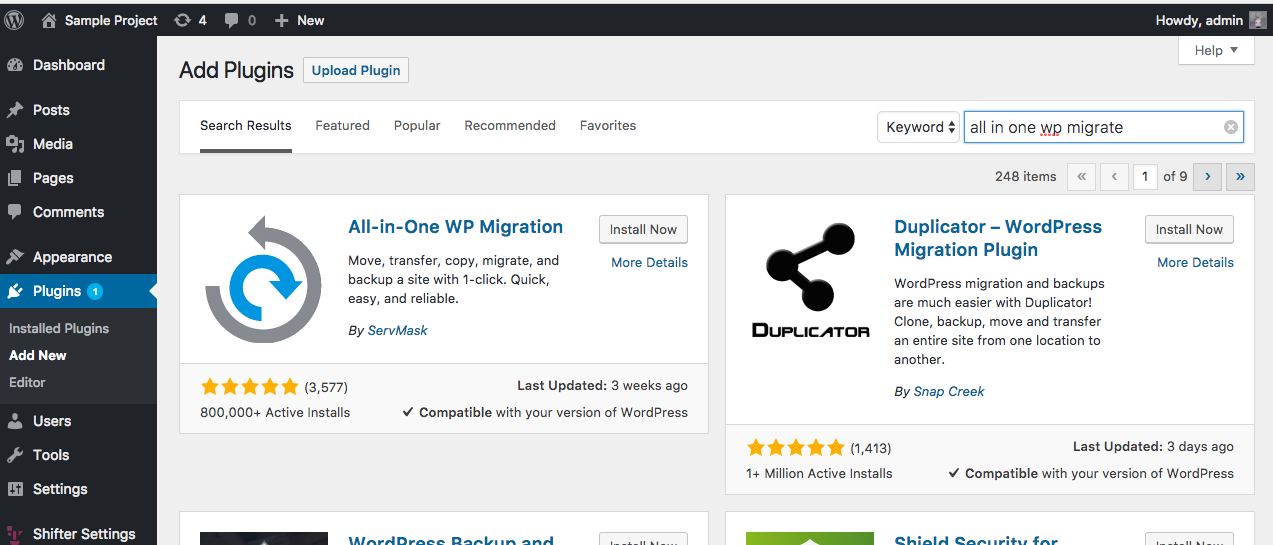
#### 1. Install All-in-One WP Migration and Backup WordPress Plugin into a running WordPress
This plugin is freely available in the WordPress Plugins directory. Install directly through your WordPress site or download and upload it through your WordPress Dashboard.
[](https://downloads.intercomcdn.com/i/o/38940859/754b2ad0c6c308aa3f5cdadc/Screenshot+2017-11-08+17.57.02.png)
#### 2. Deactivate or uninstall some plugins which may cause the failure of migration
- [WP Config File Editor](https://wordpress.org/plugins/wp-config-file-editor/) (should be deactivated; it may crash WordPress on Shifter,)
- [SiteGuard WP Plugin](https://wordpress.org/plugins/siteguard/) (should be deactivated; it may cause of login failure)
- Plugins are the backend for the WordPress object cache (deactivate recommend; e.g. [Redis Object Cache](https://wordpress.org/plugins/tribe-object-cache/), [Simple Cache](https://wordpress.org/plugins/simple-cache/), [APC Object Cache Backend](https://wordpress.org/plugins/apc/) or called [Object Cache Plugins](https://codex.wordpress.org/Class_Reference/WP_Object_Cache).)
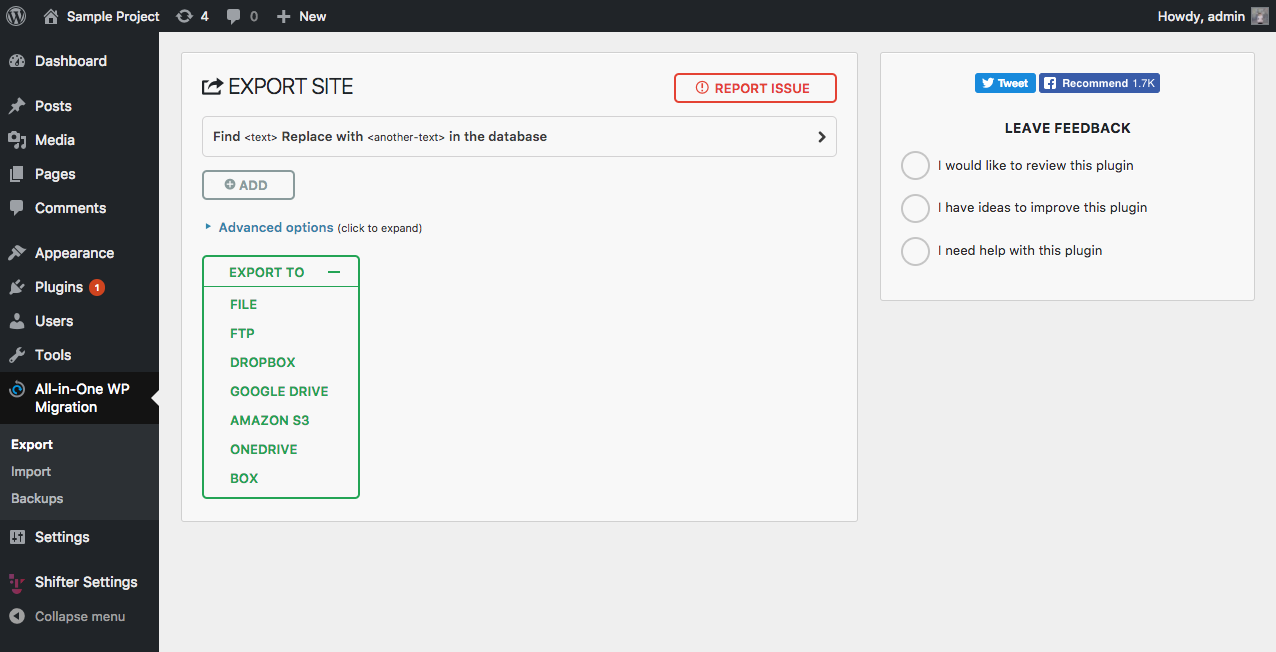
#### 3. Export / Create a file backup of your current WordPress site
Create a complete backup of your existing site you wish to migrate. This plugin also offers a few options like Dropbox, Amazon S3 and more as a premium option.
Migrating from Shifter Version 1 to 2? See our tips before for that.
[](https://downloads.intercomcdn.com/i/o/38941330/6daeefbbb056ffdd4e064bb0/Screenshot+2017-11-08+18.03.04.png)
### On new WordPress runs on AMIMOTO Managed Hosting
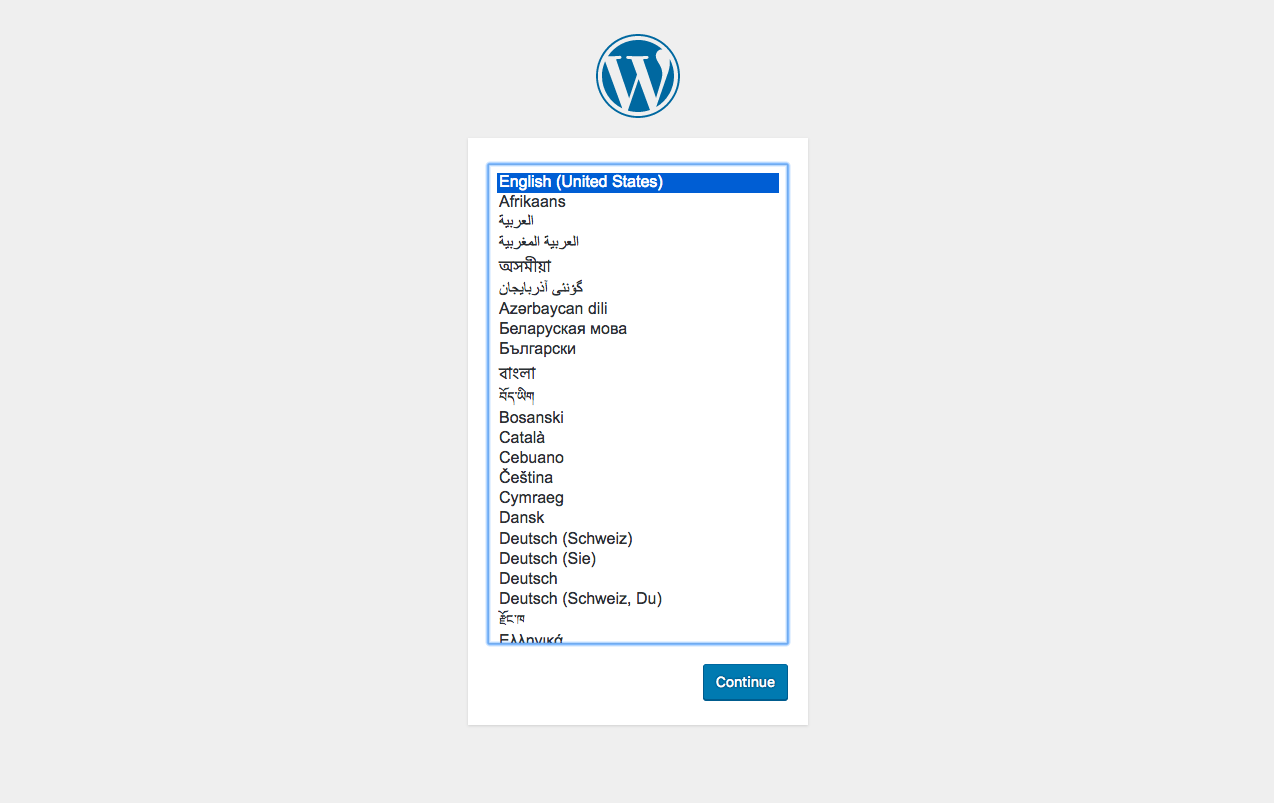
#### 4. Finish initial WordPress setup (if you didn't), and log-in WordPress Dashboard
#### 5. Install and activate the All-in-One WP Migration and Backup plugin
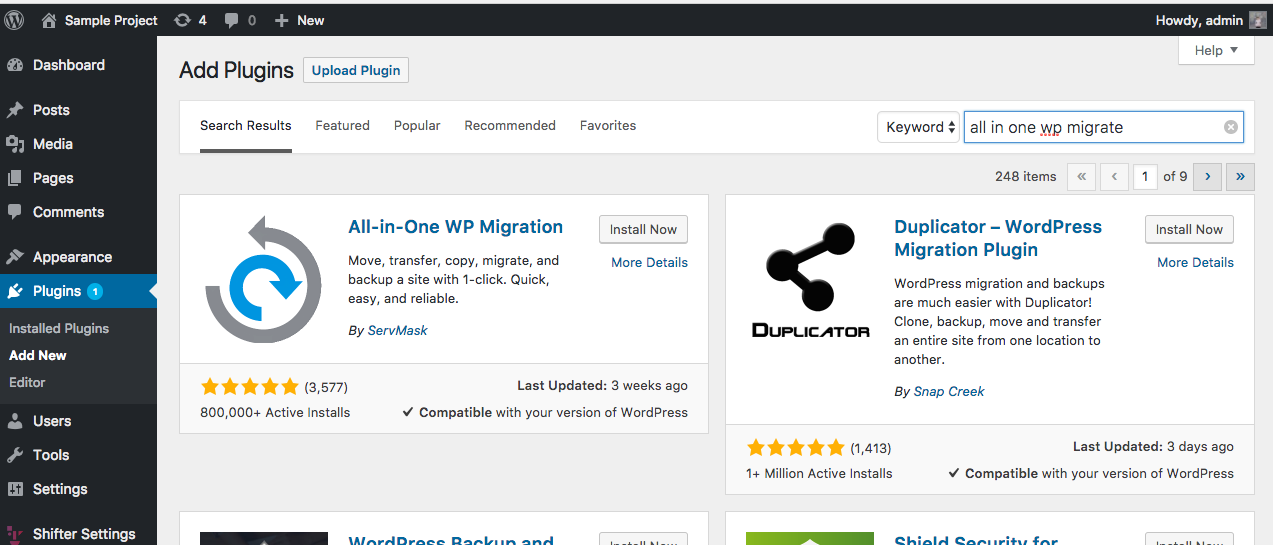
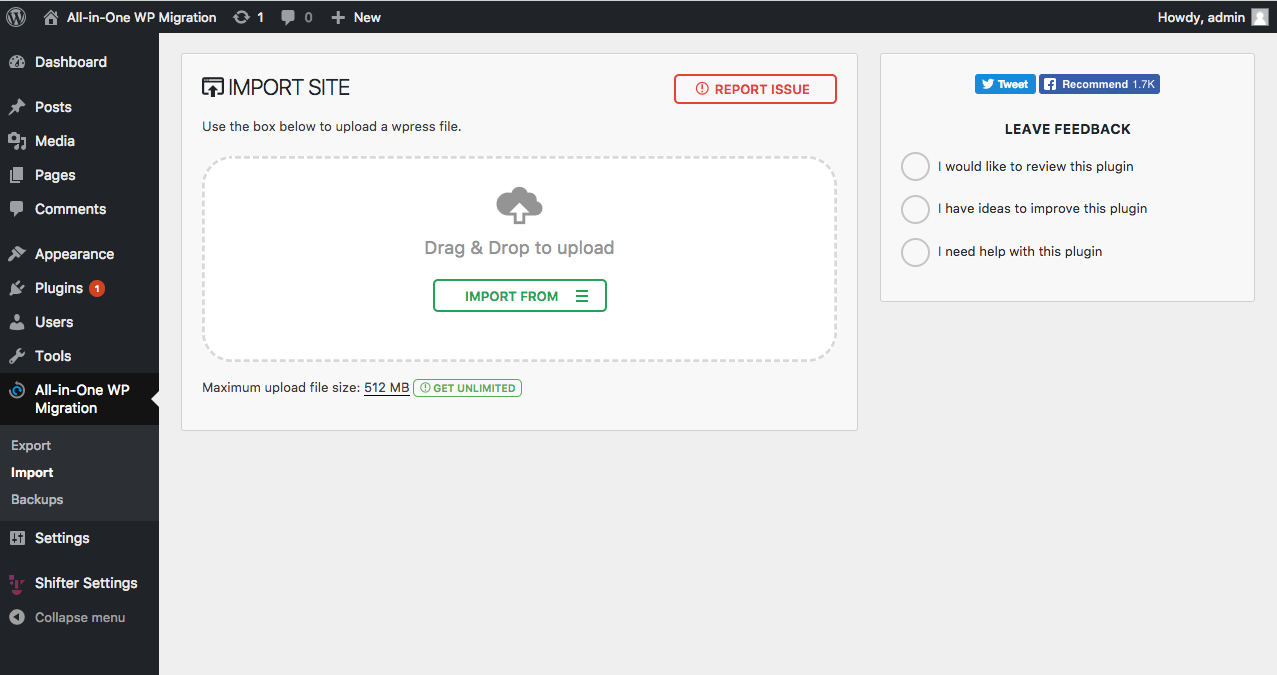
Log in to your new WordPress site, navigate to the WordPress Plugins directory and install or upload the All-in-One WP Migration and Backup Plugin.
After activating the plugin, navigate to the All-in-One WP Migration and Backup Plugin Import page.
[](https://downloads.intercomcdn.com/i/o/38942257/379e5945c2429ed42e14f609/Screenshot+2017-11-08+17.57.02.png)
#### 6. Importing your backup file
From the All-in-One WP Migration and Backup Import page you can select or drag your backup to begin the process.
Once the migration is complete, it will ask to overwrite data and files. Since this is a new WordPress install this should be okay to do.
[](https://downloads.intercomcdn.com/i/o/38942286/aa3859506a4876ce35867302/Screenshot+2017-11-08+18.14.24.png)
### Tips
#### Details usage or installation
Please get in touch with the developer of this plugin for asking how to install it, details of configurations or how to use.
- [Support page on the plugin directory of WordPress.org](https://wordpress.org/support/plugin/all-in-one-wp-migration)
- [Official support page](https://help.servmask.com/section/all-in-one-wp-migration/)
#### Logging in
Please note, when importing a backup it will replace all of the existing content including the usernames and passwords on that new site. If you are having trouble accessing your account try using the old username and password from the migrated site.
If that doesn't work, you can also try resetting the password.
#### WordPress Password Reset Email Spam
If you need to request a new password after importing, **check your spam folder**. Password reset emails usually end up there.
If you've check that and still nothing, let us know and we'll figure it out.
#### Migrating a Large Site
Migrating a large site is possible but with this plugin you may need to go premium since it only supports site up to 512MB. If your site is over that size, contact us and we should be able to help you out.
#### Are you stuck?
If you're experiencing issues and not sure what to do, please reach out. We can help you troubleshoot or make recommendations. We're here to help!
Did this answer your question?
- [Amimoto Managed Hosting](https://knowledge.amimoto-ami.com/knowledge/amimoto-managed-hosting?hsLang=ja#main-content)
- [基本事項](https://knowledge.amimoto-ami.com/knowledge/amimoto-managed-hosting?hsLang=ja#%E5%9F%BA%E6%9C%AC%E4%BA%8B%E9%A0%85)
- [スタートアップガイド](https://knowledge.amimoto-ami.com/knowledge/amimoto-managed-hosting?hsLang=ja#%E3%82%B9%E3%82%BF%E3%83%BC%E3%83%88%E3%82%A2%E3%83%83%E3%83%97%E3%82%AC%E3%82%A4%E3%83%89)
- [他社サーバから移行したい](https://knowledge.amimoto-ami.com/knowledge/amimoto-managed-hosting?hsLang=ja#%E4%BB%96%E7%A4%BE%E3%82%B5%E3%83%BC%E3%83%90%E3%81%8B%E3%82%89%E7%A7%BB%E8%A1%8C%E3%81%97%E3%81%9F%E3%81%84)
- [管理画面のご利用方法](https://knowledge.amimoto-ami.com/knowledge/amimoto-managed-hosting?hsLang=ja#%E7%AE%A1%E7%90%86%E7%94%BB%E9%9D%A2%E3%81%AE%E3%81%94%E5%88%A9%E7%94%A8%E6%96%B9%E6%B3%95)
- [サーバー接続](https://knowledge.amimoto-ami.com/knowledge/amimoto-managed-hosting?hsLang=ja#%E3%82%B5%E3%83%BC%E3%83%90%E3%83%BC%E6%8E%A5%E7%B6%9A)
- [ご契約・お支払い](https://knowledge.amimoto-ami.com/knowledge/amimoto-managed-hosting?hsLang=ja#%E3%81%94%E5%A5%91%E7%B4%84-%E3%81%8A%E6%94%AF%E6%89%95%E3%81%84)
- [よくあるお問い合わせ](https://knowledge.amimoto-ami.com/knowledge/amimoto-managed-hosting?hsLang=ja#%E3%82%88%E3%81%8F%E3%81%82%E3%82%8B%E3%81%8A%E5%95%8F%E3%81%84%E5%90%88%E3%82%8F%E3%81%9B)
- [トラブルシューティング](https://knowledge.amimoto-ami.com/knowledge/amimoto-managed-hosting?hsLang=ja#%E3%83%88%E3%83%A9%E3%83%96%E3%83%AB%E3%82%B7%E3%83%A5%E3%83%BC%E3%83%86%E3%82%A3%E3%83%B3%E3%82%B0)
- [プリインストールされているプラグイン](https://knowledge.amimoto-ami.com/knowledge/amimoto-managed-hosting?hsLang=ja#%E3%83%97%E3%83%AA%E3%82%A4%E3%83%B3%E3%82%B9%E3%83%88%E3%83%BC%E3%83%AB%E3%81%95%E3%82%8C%E3%81%A6%E3%81%84%E3%82%8B%E3%83%97%E3%83%A9%E3%82%B0%E3%82%A4%E3%83%B3)
- [ベンダー別 DNS 設定ガイド](https://knowledge.amimoto-ami.com/knowledge/amimoto-managed-hosting?hsLang=ja#%E3%83%99%E3%83%B3%E3%83%80%E3%83%BC%E5%88%A5-dns-%E8%A8%AD%E5%AE%9A%E3%82%AC%E3%82%A4%E3%83%89)
- [活用 Tips (メール編)](https://knowledge.amimoto-ami.com/knowledge/amimoto-managed-hosting?hsLang=ja#%E6%B4%BB%E7%94%A8-tips-%E3%83%A1%E3%83%BC%E3%83%AB%E7%B7%A8)
- [活用 Tips (キャッシュ編)](https://knowledge.amimoto-ami.com/knowledge/amimoto-managed-hosting?hsLang=ja#%E6%B4%BB%E7%94%A8-tips-%E3%82%AD%E3%83%A3%E3%83%83%E3%82%B7%E3%83%A5%E7%B7%A8)
- [活用 Tips (運用編)](https://knowledge.amimoto-ami.com/knowledge/amimoto-managed-hosting?hsLang=ja#%E6%B4%BB%E7%94%A8-tips-%E9%81%8B%E7%94%A8%E7%B7%A8)
- [活用 Tips (インテグレーション編)](https://knowledge.amimoto-ami.com/knowledge/amimoto-managed-hosting?hsLang=ja#%E6%B4%BB%E7%94%A8-tips-%E3%82%A4%E3%83%B3%E3%83%86%E3%82%B0%E3%83%AC%E3%83%BC%E3%82%B7%E3%83%A7%E3%83%B3%E7%B7%A8)
- [活用 Tips (開発編)](https://knowledge.amimoto-ami.com/knowledge/amimoto-managed-hosting?hsLang=ja#%E6%B4%BB%E7%94%A8-tips-%E9%96%8B%E7%99%BA%E7%B7%A8)
- [非推奨のプラグイン](https://knowledge.amimoto-ami.com/knowledge/amimoto-managed-hosting?hsLang=ja#%E9%9D%9E%E6%8E%A8%E5%A5%A8%E3%81%AE%E3%83%97%E3%83%A9%E3%82%B0%E3%82%A4%E3%83%B3)
- [サービス全般](https://knowledge.amimoto-ami.com/knowledge/amimoto-managed-hosting?hsLang=ja#%E3%82%B5%E3%83%BC%E3%83%93%E3%82%B9%E5%85%A8%E8%88%AC)
- [メンテナンス](https://knowledge.amimoto-ami.com/knowledge/amimoto-managed-hosting?hsLang=ja#%E3%83%A1%E3%83%B3%E3%83%86%E3%83%8A%E3%83%B3%E3%82%B9)
- [Amimoto AMI](https://knowledge.amimoto-ami.com/knowledge/amimoto-ami?hsLang=ja#main-content)
- [基本的なご利用方法](https://knowledge.amimoto-ami.com/knowledge/amimoto-ami?hsLang=ja#%E5%9F%BA%E6%9C%AC%E7%9A%84%E3%81%AA%E3%81%94%E5%88%A9%E7%94%A8%E6%96%B9%E6%B3%95)
- [サーバーへの接続](https://knowledge.amimoto-ami.com/knowledge/amimoto-ami?hsLang=ja#%E3%82%B5%E3%83%BC%E3%83%90%E3%83%BC%E3%81%B8%E3%81%AE%E6%8E%A5%E7%B6%9A)
- [活用Tips](https://knowledge.amimoto-ami.com/knowledge/amimoto-ami?hsLang=ja#%E6%B4%BB%E7%94%A8tips)
- [よくあるお問い合わせ](https://knowledge.amimoto-ami.com/knowledge/amimoto-ami?hsLang=ja#%E3%82%88%E3%81%8F%E3%81%82%E3%82%8B%E3%81%8A%E5%95%8F%E3%81%84%E5%90%88%E3%82%8F%E3%81%9B)
- [トラブルシューティング](https://knowledge.amimoto-ami.com/knowledge/amimoto-ami?hsLang=ja#%E3%83%88%E3%83%A9%E3%83%96%E3%83%AB%E3%82%B7%E3%83%A5%E3%83%BC%E3%83%86%E3%82%A3%E3%83%B3%E3%82%B0)
- [\[EN\] Amimoto Managed Hosting](https://knowledge.amimoto-ami.com/knowledge/en-amimoto-managed-hosting?hsLang=ja#main-content)
- [Migration tips for AMIMOTO Managed Hosting](https://knowledge.amimoto-ami.com/knowledge/en-amimoto-managed-hosting?hsLang=ja#migration-tips-for-amimoto-managed-hosting)
- ホーム
- 製品
- 価格
- ブログ
- 会社
[](https://ja.amimoto-ami.com/)
Flexible Cloud WordPress Hosting
Copyright © 2026, 株式会社デジタルキューブ