---
title: How to Delete CloudFormation?
description: Access CloudFormation Dashboard Then Click Actions → Delete Stack Click YES, DELETE to delete completely Access To VPC Dashboard, Click Action → Delete VPC Confirm Deleting VPC, Click Delete Acces
---
[Skip to content](https://knowledge.amimoto-ami.com/en/knowledge/how-to-delete-cloudformation#main-content)
English
Show submenu for translations
![Amimoto-dark-ogp.png\]](https://knowledge.amimoto-ami.com/hs-fs/hubfs/Amimoto-dark-ogp.png?height=40&name=Amimoto-dark-ogp.png)
- ホーム
- 製品
- 価格
- ブログ
- 会社
Open main navigation
Close main navigation
- ホーム
- 製品
- 価格
- ブログ
- 会社
- English
Show submenu for translations
- [https://amimoto-ami.com/](https://amimoto-ami.com/)
[https://amimoto-ami.com/](https://amimoto-ami.com/)
Hello. How can we help you?
- There are no suggestions because the search field is empty.
1. [Amimoto Help Center](https://knowledge.amimoto-ami.com/en/knowledge?hsLang=en)
2. [Amimoto AMI](https://knowledge.amimoto-ami.com/en/knowledge/amimoto-ami?hsLang=en)
3. [Tips for JINKEI](https://knowledge.amimoto-ami.com/en/knowledge/amimoto-ami?hsLang=en#tips-for-jinkei)
# How to Delete CloudFormation?
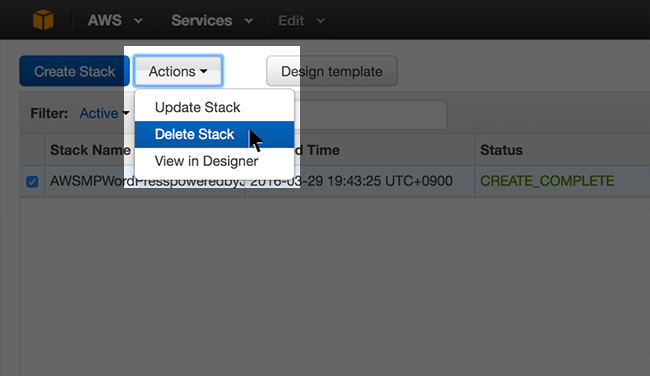
### CloudFormation Stack Deletion
Access CloudFormation Dashboard Then Click Actions → Delete Stack
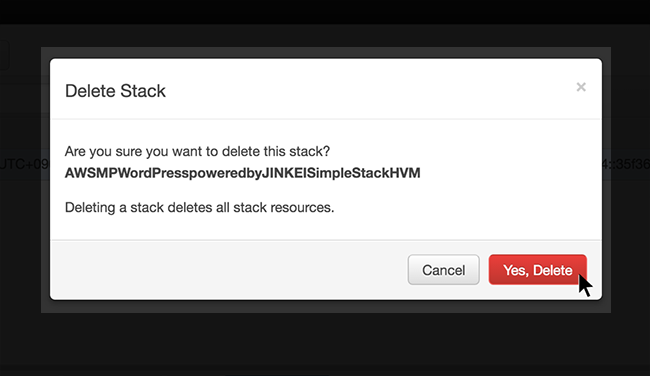
### Delete Stack
Click YES, DELETE to delete completely
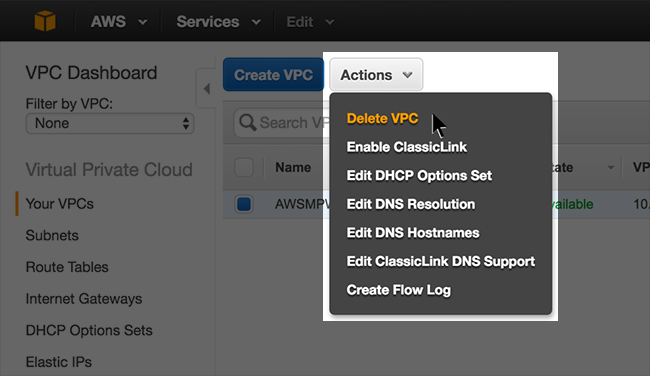
### VPC Deletion
Access To VPC Dashboard, Click Action → Delete VPC
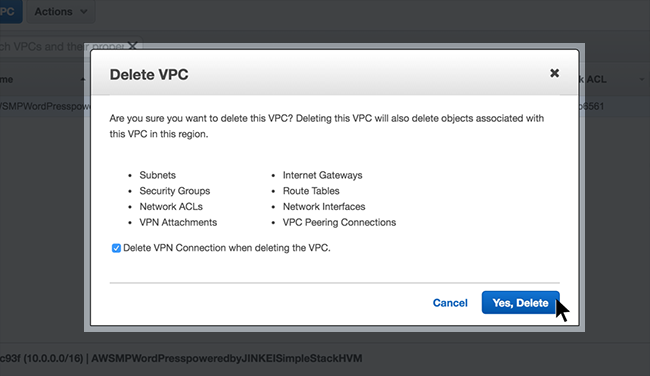
### VPC Deletion
Confirm Deleting VPC, Click Delete
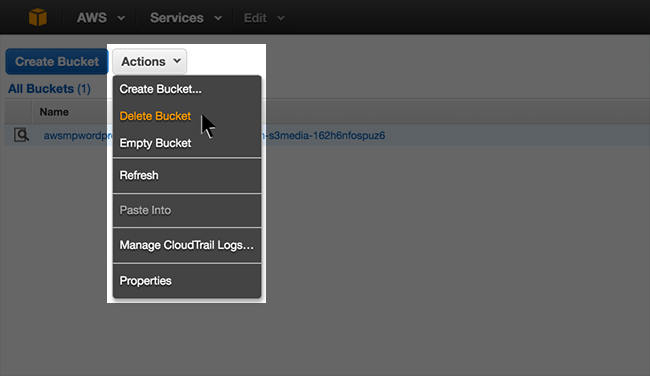
### S3 Bucket Deletion
Access To VPC Dashboard Choose Action → Delete Bucket
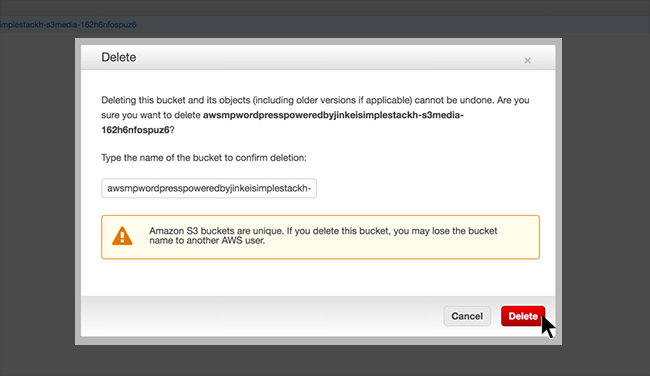
### S3 Bucket Deletion
Confirm Deletion of S3 Bucket, Click Delete
- [Amimoto Managed Hosting](https://knowledge.amimoto-ami.com/en/knowledge/amimoto-managed-hosting?hsLang=en#main-content)
- [Basics](https://knowledge.amimoto-ami.com/en/knowledge/amimoto-managed-hosting?hsLang=en#basics)
- [Amimoto Essential Training](https://knowledge.amimoto-ami.com/en/knowledge/amimoto-managed-hosting?hsLang=en#amimoto-essential-training)
- [Migration tips for AMIMOTO Managed Hosting](https://knowledge.amimoto-ami.com/en/knowledge/amimoto-managed-hosting?hsLang=en#migration-tips-for-amimoto-managed-hosting)
- [Amimoto Dashboard Tips](https://knowledge.amimoto-ami.com/en/knowledge/amimoto-managed-hosting?hsLang=en#amimoto-dashboard-tips)
- [Connecting to the Server](https://knowledge.amimoto-ami.com/en/knowledge/amimoto-managed-hosting?hsLang=en#connecting-to-the-server)
- [Account and Billing](https://knowledge.amimoto-ami.com/en/knowledge/amimoto-managed-hosting?hsLang=en#account-and-billing)
- [Trouble shooting](https://knowledge.amimoto-ami.com/en/knowledge/amimoto-managed-hosting?hsLang=en#trouble-shooting)
- [WordPress Plugins](https://knowledge.amimoto-ami.com/en/knowledge/amimoto-managed-hosting?hsLang=en#wordpress-plugins)
- [Tips for DNS Vendors](https://knowledge.amimoto-ami.com/en/knowledge/amimoto-managed-hosting?hsLang=en#tips-for-dns-vendors)
- [Email](https://knowledge.amimoto-ami.com/en/knowledge/amimoto-managed-hosting?hsLang=en#email)
- [CDN and Cache control](https://knowledge.amimoto-ami.com/en/knowledge/amimoto-managed-hosting?hsLang=en#cdn-and-cache-control)
- [Server & AWS Management](https://knowledge.amimoto-ami.com/en/knowledge/amimoto-managed-hosting?hsLang=en#server-aws-management)
- [Integration](https://knowledge.amimoto-ami.com/en/knowledge/amimoto-managed-hosting?hsLang=en#integration)
- [Development](https://knowledge.amimoto-ami.com/en/knowledge/amimoto-managed-hosting?hsLang=en#development)
- [Amimoto AMI](https://knowledge.amimoto-ami.com/en/knowledge/amimoto-ami?hsLang=en#main-content)
- [Getting Started with Amimoto-AMI](https://knowledge.amimoto-ami.com/en/knowledge/amimoto-ami?hsLang=en#getting-started-with-amimoto-ami)
- [Basics](https://knowledge.amimoto-ami.com/en/knowledge/amimoto-ami?hsLang=en#basics)
- [Connection to Amimoto AMI](https://knowledge.amimoto-ami.com/en/knowledge/amimoto-ami?hsLang=en#connection-to-amimoto-ami)
- [Tips](https://knowledge.amimoto-ami.com/en/knowledge/amimoto-ami?hsLang=en#tips)
- [FAQs](https://knowledge.amimoto-ami.com/en/knowledge/amimoto-ami?hsLang=en#faqs)
- [Trouble shooting](https://knowledge.amimoto-ami.com/en/knowledge/amimoto-ami?hsLang=en#trouble-shooting)
- [Getting Started with Amimoto JIN-KEI](https://knowledge.amimoto-ami.com/en/knowledge/amimoto-ami?hsLang=en#getting-started-with-amimoto-jin-kei)
- [Tips for JINKEI](https://knowledge.amimoto-ami.com/en/knowledge/amimoto-ami?hsLang=en#tips-for-jinkei)
- [Support](https://knowledge.amimoto-ami.com/en/knowledge/amimoto-ami?hsLang=en#support)
- [\[EN\] Amimoto Managed Hosting](https://knowledge.amimoto-ami.com/en/knowledge/en-amimoto-managed-hosting?hsLang=en#main-content)
- [Company and Guidelines](https://knowledge.amimoto-ami.com/en/knowledge/en-amimoto-managed-hosting?hsLang=en#company-and-guidelines)
- ホーム
- 製品
- 価格
- ブログ
- 会社
[](https://ja.amimoto-ami.com/)
Amimoto Help Center
Copyright © 2026, 株式会社デジタルキューブ